---
updatedAt: 2025-09-16T00:00:26.000Z
agentTools:
projectIndex: https://developers.hivelocity.net/llms.txt
---
# Bare Metal Servers
Hivelocity offers more variety of servers than any other bare metal cloud on the market. Specific hardware configurations are referred to as *products* throughout our API and website. If you wish to see a full list of products, the quickest way is on the [dedicated server page](https://www.hivelocity.net/dedicated-servers/).
# Inventory
The inventory API endpoints return information about what types of products your organization and client account can provision.
Sending a `GET` request to [/inventory/product](https://developers.hivelocity.net/reference/get_stock_resource) will return a list of all the available products that your user account is able to provision including detailed information about each product. For more detail, see the [Facilities](https://developers.hivelocity.net/docs/facilities) doc.
```
curl -X 'GET' \
'https://core.hivelocity.net/api/v2/inventory/product?location=MAIN&group_by=facility' \
-H 'accept: application/json' \
-H "X-API-KEY: $API_KEY"
```
# Product Options
Each server has a set of *options* for configuring the deployment. Some examples of options are additional bandwidth, [Backups](https://developers.hivelocity.net/docs/backups-and-rapid-restore), and [Server Management](https://developers.hivelocity.net/docs/server-management) . There are other options depending on the product. Options are selected by sending their *id* along with the deployment request via the API or by selecting them in the store GUI. To get a list of options, send a `GET` request to [/product/PRODUCT\_ID/options](https://developers.hivelocity.net/reference/get_product_option_resource).
```
curl -X 'GET' \
'https://core.hivelocity.net/api/v2/product/$PRODUCT_ID/options' \
-H 'accept: application/json' \
-H "X-API-KEY: $API_KEY"
```
You can also view a server's options by visiting its configuration page in the store. For example, here are bandwidth egress options from the store:
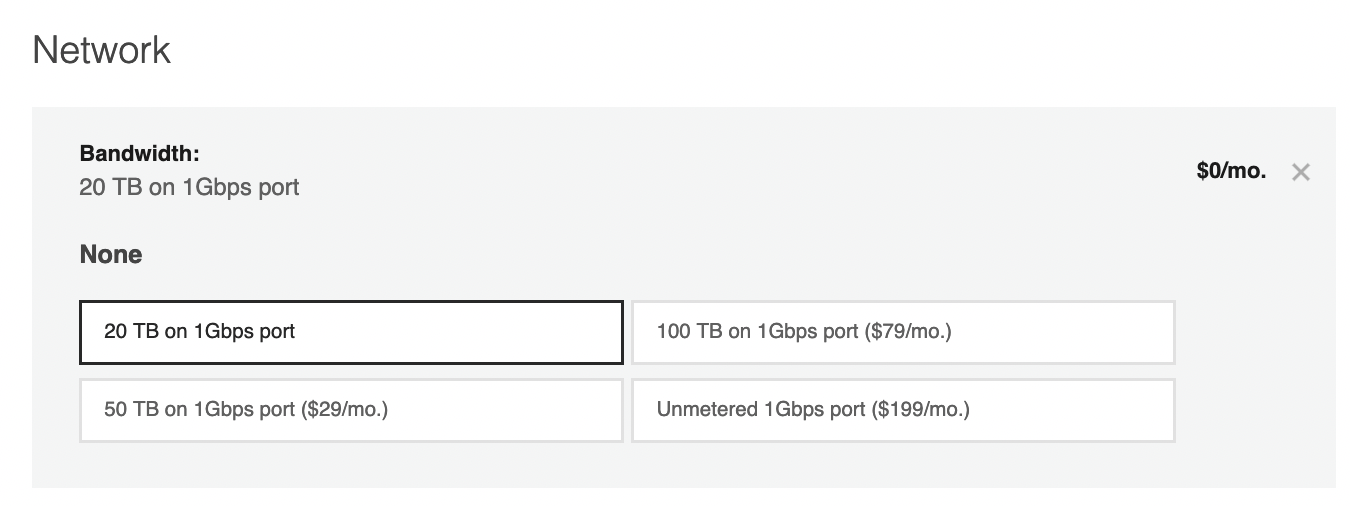
Option ids are static across all products. This means that if an option has an id of `13435`, all other products will accept the same option id `13435` if that option is available on the product.
## Option Compatibility
Some options are incompatible with others. An example would be attempting to deploy *Linux Managed Service* with a *Windows* Operating System. Each option returns two fields, `tags` and `expressions`, that form an LR Parser. To help developers check for compatibility using these two fields, you can use [this helpful gist](https://gist.github.com/exit99/546a0e2e7e8f85f64ed0b87578706f89) which contains the snippet we use in our own store.
# Devices in the API
## Deploying a Server
For most use cases, `bare-metal-devices` endpoints are used to provision and de-provision [Instant Servers](https://developers.hivelocity.net/docs/instant). For example, to deploy a new instant server, send a `POST` request to [/bare-metal-devices](https://developers.hivelocity.net/reference/post_bare_metal_device_resource). A more in-depth explanation of on-demand server provisioning can be found on the [Instant Servers](https://developers.hivelocity.net/docs/instant) page.
> 🚧 Caveats to deploying test servers.
>
> The request below will result in charges on your account and will only succeed if you have completed [Account Verification](https://developers.hivelocity.net/docs/account-verification)
```
curl -X 'POST' \
'https://core-prod.stacklocity.net/api/v2/bare-metal-devices/' \
-H 'accept: application/json' \
-H "X-API-KEY: $API_KEY" \
-H 'Content-Type: application/json' \
-d '{
"period": "hourly",
"productId": 576,
"hostname": "your.hostname.com",
"locationName": "NYC1",
"osName": "CentOS 7.x"
}'
```
# Getting Device Info
The `device` endpoints are used to manage all your devices including non-server hardware, such as hardware firewalls or hardware load balancers. These endpoints are typically used to display, power off/on, edit your servers outside of provisioning.
For example, to retrieve information about all the devices on your *clientaccount* , send a `GET` request to [/device](https://developers.hivelocity.net/reference/get_device_id_resource).
```
curl -X 'GET' \
'https://core.hivelocity.net/api/v2/device/' \
-H 'accept: application/json' \
-H "X-API-KEY: $API_KEY"
```
There are many more features that the Hivelocity API offers for server management and configuration. For more information, please see the [API Reference](https://developers.hivelocity.net/reference/device).